
Pre-Appointment Emails That Only Reach the Right Clients
We screen upcoming visits against rigorous eligibility criteria to ensure clients only receive SnoutStart emails when they’re relevant to their pet and appointment.
Eligibility Check
Screening in real time Homer
“Yearly checkup and vaccines”
Emails scheduled
Homer
“Yearly checkup and vaccines”
Emails scheduled
 Mr. Whiskers
“Not eating since Tuesday”
Not sent: sick visit
Mr. Whiskers
“Not eating since Tuesday”
Not sent: sick visit
 Butters
“Recheck bloodwork, on daily meds”
Not sent: risk signals
Butters
“Recheck bloodwork, on daily meds”
Not sent: risk signals
Example appointments, for illustration.
Recipient Criteria
We only send pre-appointment emails for visits that meet all the criteria below. If anything in the booking suggests a wellness message could feel out of place, we won’t send one.
All of These Must Be True
- Your hospital is opted in to SnoutStart pre-appointment emails
- The pet is a dog or cat
- The pet isn't already enrolled in a Snout plan
- The pet has an upcoming appointment at your hospital
- A valid email address is on file
- The pet is 12 or younger (pets aged 10–12 must also show no additional risk signals)
- The appointment passes our real-time risk screening
How We Keep Every Email Appropriate
We automatically exclude an appointment when:
- It looks like a sick visit. The booking notes include a sick indicator flag (we have hundreds!).
- The owner has raised a concern. The notes describe a worry or symptom the owner reported.
- The pet's condition is ongoing or complicated. Lengthy notes suggest more than a routine visit.
- A senior pet shows risk signals. Pets aged 10–12 are excluded if there's any additional risk signal, and pets older than 12 do not qualify for these emails.
Because screening happens in real time, the latest booking details are checked before each email in the series sends. The criteria are built to err on the side of caution.
Send Timing
Up to three emails go out. Communications cease if the pet parent enrolls or unsubscribes.
- 7 days beforeLight introduction to Snout; encourages pet parent to learn more and enroll before their upcoming visit
- 3 days beforeA gentle nudge – confirmation that your team designed these plans based on the routine and preventive care you recommend for their pet
- 1 day beforeA friendly reminder to enroll before arrival to get their exam fee covered
- Day ofFor late entrants only
Clients who receive three pre-appointment emails enroll in a Snout plan at 3x the rate of those who receive just one!
Clients who book with less than a week's notice receive only the emails left before their visit.
See the Emails
Emails are intentionally simple, minimally designed, and focused on education. Shown here with sample names (Sarah, Buddy, Fernwood Animal Hospital).
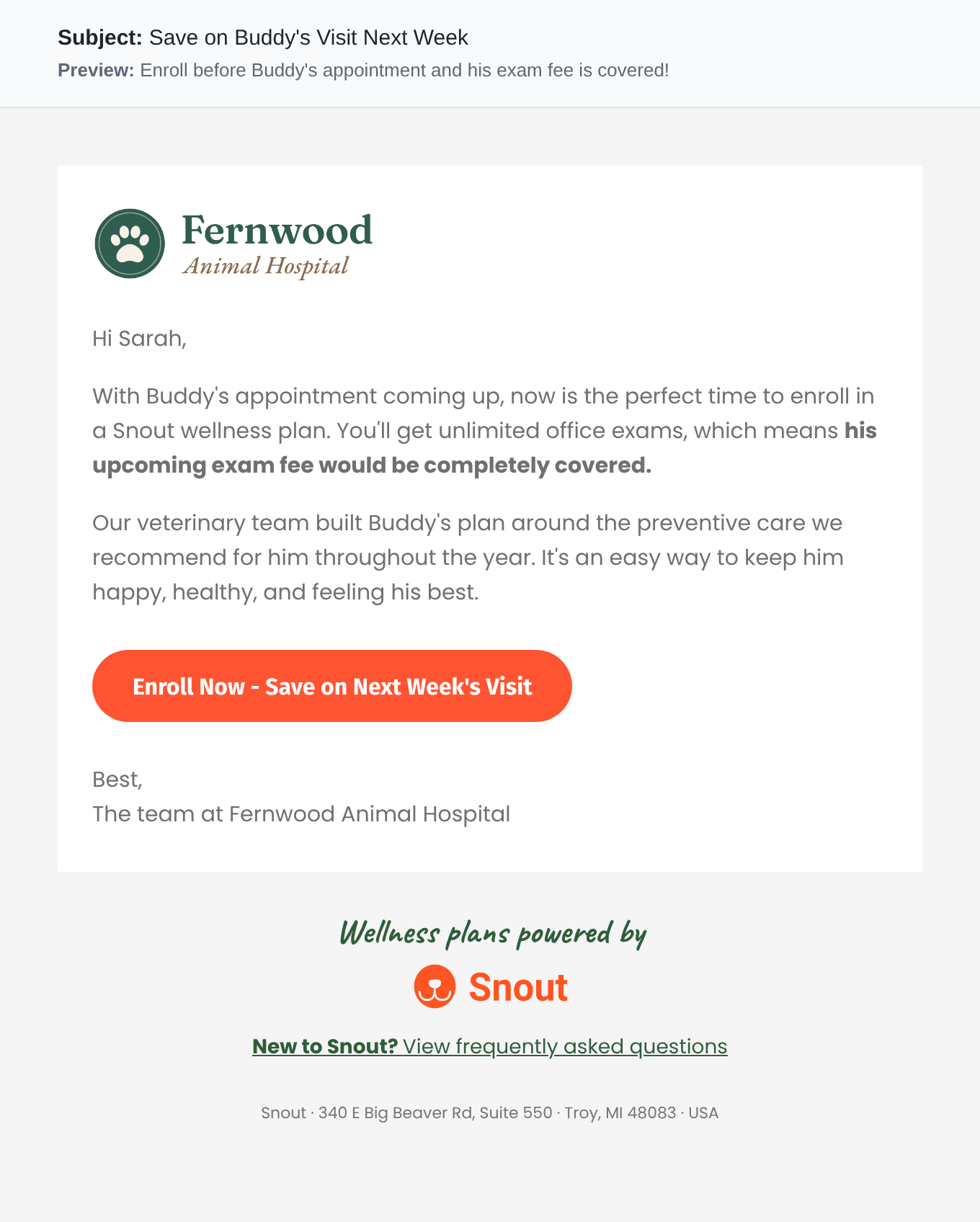
The first, gentlest touch. It introduces the plan and the exam fee savings while there's plenty of time.
What’s in Every Email
- Your hospital’s logo and name
- The client’s name
- Their pet’s name
- One clear call to action with your clinic’s unique enrollment link
- A link to frequently asked questions
- An easy way to unsubscribe from Snout communications
How Your Team Can Help
A few small habits help ensure our pre-appointment comms work their best.
Write Clear Booking Notes
Our screening reads your booking notes. Noting an illness, concern, medication or ongoing condition helps ensure only appropriate clients receive wellness messaging.
See Something? Say Something!
You'll see all clients invited through pre-appointment communications in your Snout admin portal. If you notice great wellness candidates aren't receiving them, reach out to your Clinic Success Manager so we can troubleshoot.
Point Questions to Our Team
Every email links to frequently asked questions. Pet parents are encouraged to check them out or contact our team with specific support needs.
Questions or Concerns?
If you have a concern about a specific client, want to review the eligibility criteria, or want to pause or opt out, contact your Clinic Success Manager.